- Published on
Player 2 / crypto - EN
Introduction
boroCTF 2026 ran from Friday, June 12, 2026, 22:00 CEST to Tuesday, June 16, 2026, 05:59 CEST. The CTF lasted about 80 hours and had about 114 challenges. I say "about" because I did not track whether any tasks were removed during the event.
The challenges were fairly diverse. There was a lot of OSINT, some guessy tasks, and many simpler challenges that AI agents could solve very quickly. There were also tasks where simply running a model was not enough, and we had to combine automation with manual analysis. Player 2 was one of those tasks.
Challenge Description
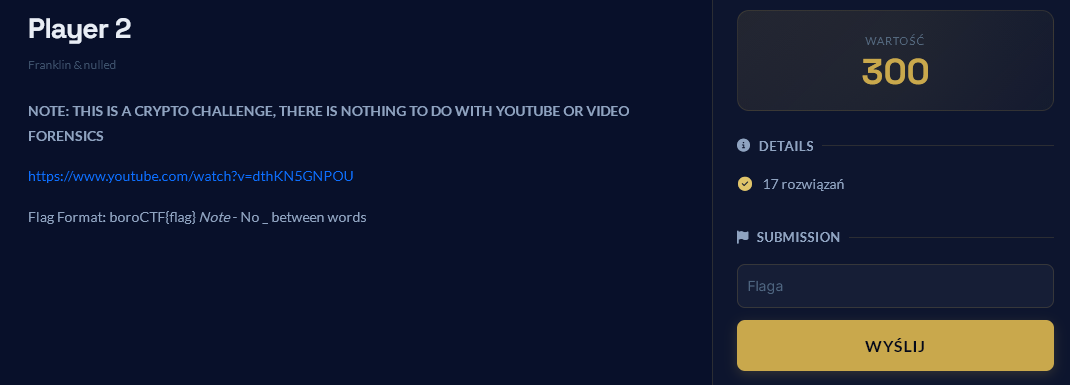
The challenge was in the crypto category and was worth 300 points, even though at first glance it looked like forensics or video stego.
We received a YouTube link. The video showed gameplay and an overlay with a PlayStation controller. The second version of the video was important, because the first one was corrected during the CTF.
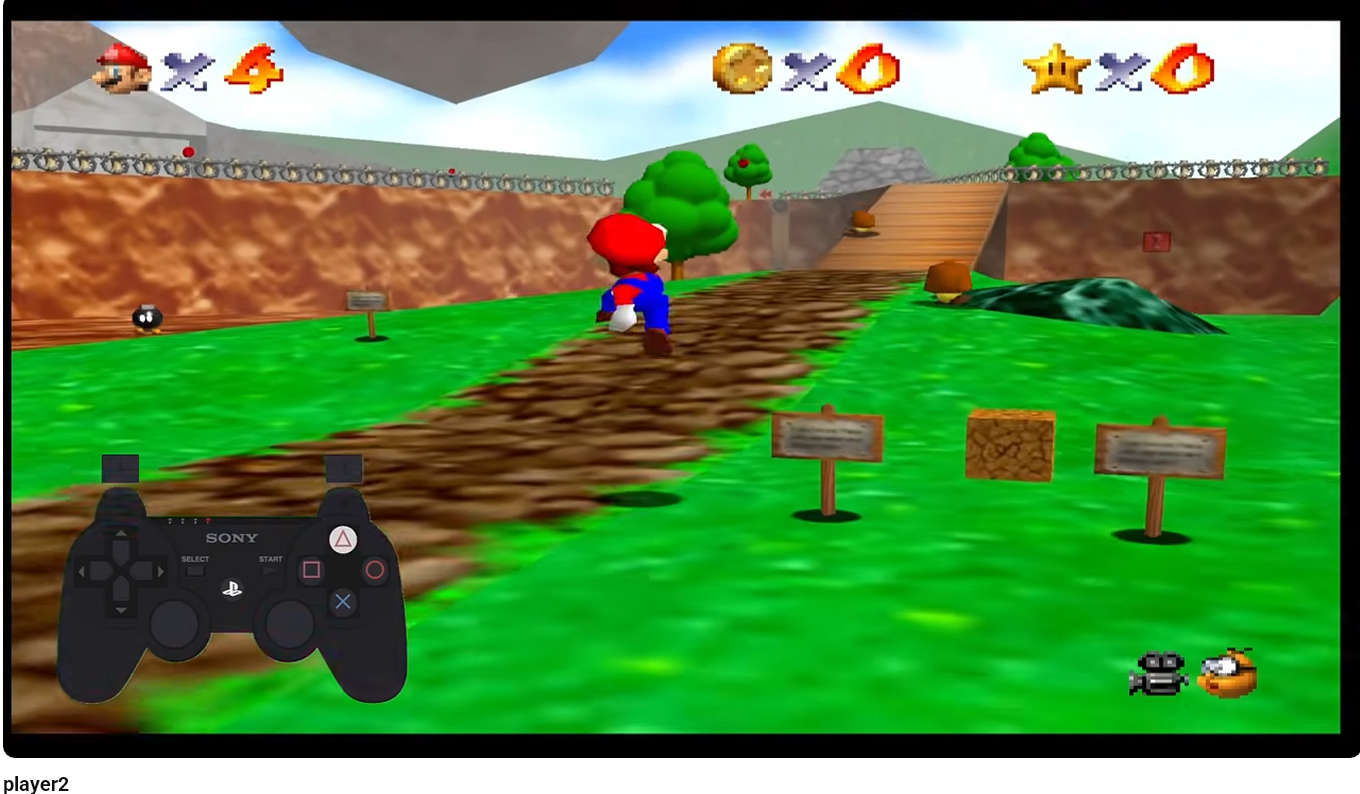
The key observation was simple: since the controller is visible, the data is most likely encoded in consecutive button presses. The video was not the actual steganographic layer. It was only a carrier for the input sequence.
Extracting the Video and Frames
I downloaded the video from YouTube like this:
yt-dlp -f 136 https://www.youtube.com/watch?v=dthKN5GNPOU
Then I cropped only the controller area:
ffmpeg -i wejscie.mp4 -vf "crop=330:234:50:434" -c:a copy pad_wycinek.mp4
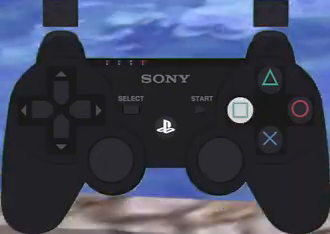
Next, I split the cropped video into frames. There were over 6000 frames, so manually reviewing everything made no sense. The first step was to discard frames where no button was pressed.
For that, we wrote a simple script that analyzed pixel differences against a baseline frame with no pressed button. The script looked only at the specific button regions, so it could ignore the moving background. This worked well enough as a filter, but not as a perfect classifier.
After filtering empty frames, we still had to group consecutive frames belonging to the same button press. For example, if one press lasted from frame_0063.png to frame_0067.png, we kept one representative image from that group.
After cleaning, we had 164 button presses and one empty/special image.
Problems with Automatic Reading
This is where errors started. The automation was useful, but it could not be trusted without human verification.
The biggest problem was triangle. Sometimes it did not look like a bright fill of the whole button, but only like a subtle change in the symbol or outline. A simple pixel-difference threshold detected it poorly or confused it with the background.
Frames that required special manual attention for triangle:
082, 118, 619, 1695, 1973, 3537, 3743, 3968, 4301, 4733, 5347
The second problem was the shoulder buttons: L1, L2, R1, R2. They are at the top of the controller, and their highlights are easy to confuse, especially when working with a cropped video rather than a perfect controller image.
This turned out to be crucial later, because in the correct solution the shoulder buttons are not standalone symbols. They modify the next button. A mistake in one shoulder button can shift the whole decoding.
First Button Sequence
After the first cleanup, I had this working sequence:
R1 triangle R2 triangle L1 down up L1 square R1 start L1 up R1 cross start R1 down L2 down triangle L1 circle L2 cross L1 circle up R1 circle L1 start L1 left L1 square L2 start left L2 down R1 circle R2 cross L2 down R2 triangle R1 circle R1 up R2 cross L1 triangle L1 up right L2 down left L1 circle R2 up R1 down right R1 right down L1 circle L1 square R2 R1 circle up L1 cross L1 circle start L2 cross R2 circle R1 down R2 up L1 triangle R1 start L1 triangle up R1 down L1 triangle left up circle R2 circle R1 down R2 triangle L1 square R1 start left R1 left R2 triangle L1 square cross up R1 start L1 square left L2 down L2 R1 circle R1 square triangle L2 square start L1 square R1 start R1 right down L1 circle R1 left square down L2 cross L2 cross R1 circle R1 square
At first this looked promising, because the first symbols could be mapped to boroCTF. For example:
001 R1       -> b
002 triangle -> o
003 R2       -> r
004 triangle -> o
005 L1       -> C
006 down     -> T
007 up       -> F
It was a tempting lead, but it fell apart quite quickly.
Dead End: Direct Mapping to boroCTF
The first hypothesis was that the raw button presses started directly with:
boroCTF{
If 1 button = 1 character, then the beginning can be hand-fitted, but it does not produce a stable table. The same button would have to mean different things in different places.
So we checked bit and hexadecimal variants.
One Button as a Nibble
If each button were one nibble, then for the beginning boro:
b = 0x62: R1       -> 6, triangle -> 2
o = 0x6f: R2       -> 6, triangle -> f
There is already a conflict: triangle would have to mean both 2 and f.
One Button as 2 Bits
We also checked a model where one button gives 2 bits, so four buttons form one byte.
For the letter b:
b = 0x62 = 01100010
R1       -> 01
triangle -> 10
R2       -> 00
triangle -> 10
More conflicts appeared for the next letters. R1, L1, and other buttons would have to change meaning depending on position. That did not look like a simple alphabet or a simple bit encoding.
Conclusion: the flag format tells us what the final result should look like, but the raw button sequence probably does not start with plaintext boroCTF{.
Dead End: Button Pairs as Nibbles
Another lead came from the sequence length:
164 button presses / 2 / 2 = 41 bytes
This suggested the model:
2 button presses = 1 hex nibble
4 button presses = 1 byte
Assuming the beginning was boroCTF{, we could assign pairs to nibbles:
R1+triangle  -> 6
R2+triangle  -> 2
L1+down      -> 6
up+L1        -> f
square+R1    -> 7
start+L1     -> 2
up+R1        -> 6
cross+start  -> f
R1+down      -> 4
L2+down      -> 3
triangle+L1  -> 5
circle+L2    -> 4
cross+L1     -> 4
circle+up    -> 6
R1+circle    -> 7
L1+start     -> b
That gave:
62 6f 72 6f 43 54 46 7b
which is exactly boroCTF{.
The problem was that this table did not work further. Across the whole sequence there were 82 pairs and 55 unique pairs. It did not look like a stable pair -> nibble mapping. It looked more like forcing the beginning to fit.
Dead End: PSX/PS2 Layout as Hex
A PlayStation controller has a natural bitmask layout that can be mapped to values 0..f:
select   -> 0
L3       -> 1
R3       -> 2
start    -> 3
up       -> 4
right    -> 5
down     -> 6
left     -> 7
L2       -> 8
R2       -> 9
L1       -> a
R1       -> b
triangle -> c
circle   -> d
cross    -> e
square   -> f
With that mapping, the sequence gave this hex string:
bc9ca64afb3a4be3b686cad8ead4bda3a7af83786bd9e869cbdb49eaca45867ad94b65b56adaf9bd4aead38e9db694acb3ac4b6ac74d9db69cafb37b79cafe4b3af7868bdbfc8f3afb3b56adb7f68e8ebdbf
When grouped into bytes, it did not produce meaningful text:
...J.:K............xk..i..I..E.z.Ke.j...J.........Kj.M.....{y..K:......:.;V.......
Swapping the nibble order inside each byte also did not produce plaintext:
..j....>kh...M.:z.8..........Th...V[......=..kI.;...|..k..;.......h.......e.{o....
This lead also failed.
Why We Got Stuck
The biggest mistake was getting attached to the assumption that the beginning must directly encode boroCTF{. It was a natural anchor, but in this challenge the flag format was not a crib for the first layer.
The second mistake was trusting automatic frame classification too much. The script was good at filtering empty frames, but it confused subtle presses, especially triangle, and it did not provide full confidence for the shoulder buttons.
The third problem was semantic: we kept treating buttons like a regular alphabet, bytes, or nibbles. Only later did it become clear that some buttons were modifiers, not standalone symbols.
False Breakthrough: P2 to TALK, but with a Bad Sequence
The real direction appeared after connecting the title Player 2 with the P2 to TALK system from Giftscop/Petscop:
https://giftscop.com/etc/p2_to_talk
In this system, controller inputs encode phonemes. Shoulder buttons (L1, L2, R1, R2) appear before a base button and select a different phoneme column. Some combinations are empty, producing a null. This matched Player 2 and the word nulled.
At first, however, we still had a wrong or incomplete sequence. After decoding it with P2-to-TALK, the phonetic text could be force-segmented as:
behind you of course right one checked failure ...
At that stage I thought this beginning was noise and wanted to ignore it. It sounded like English, but it was not yet clear how it connected to the final flag. The problem was that several missing or extra inputs and incorrectly oriented shoulder buttons shifted the phonemes. A dictionary-based model tried to fit them to known words, which produced plausible-sounding but partly wrong phrases.
The best example is the beginning b ih h i n d, which is very easy to interpret as behind. Only at the very end, after the rest of the acrostic worked, did it become clear that this beginning was not junk: it produced the boroCTF prefix.
Correcting the Sequence
The breakthrough came from comparing our sequence with JohnDoers' manual transcription. He transcribed the video inputs independently from the automation. In his notation, x meant cross, and names such as r1, l2, triangle, and circle were simply consecutive controller presses.
John's full transcription was:
r2 triangle r1 triangle l2 down up l2 square r2
start l2 up r2 x
start r2 down l1 down triangle l2 circle l1 x l2 circle up r2 circle l2 l2 left l2 square
l1 start left l1 down r2 circle r1 x l1 down r1 triangle r2 circle r2 up r1 x l2 triangle l2 up right l1 down left l2 circle r1 up r2 down right r2 right down l2 circle l2 square r1 up r2 circle up l2 x l2 circle start l1 x r1 circle r2 down r1 up l2 triangle r2 start l2 triangle up r2 down l2 triangle left
r2 up r2 circle r1 circle r2 down r1 triangle l2 square r2 start
left r2 left r1 triangle l2 square l1 x up r2 start l2 square left l1 down l1 x r2 circle r2 square triangle l1 square start l2 square r2 start right r2 right down l2 circle r2 left square l2 square l1 down l1 x l1 x r2 circle x r2 square
After normalizing button names, the sequences almost matched, but ours needed the shoulder buttons swapped:
L1 <-> L2
R1 <-> R2
After that swap, the alignment score was very high, about 0.967, but a few differences remained: one start looked extra, and a few places were missing tokens. That was enough for the earlier P2-to-TALK decoding to produce misleading words.
After correcting the sequence, P2-to-TALK no longer gave random text to read directly. It started producing groups of words whose first letters made sense.
Correct Solution
The correct stream must be read as P2-to-TALK phonemes and then segmented into words. This was the easy-to-miss shortcut in the earlier reasoning: John's transcription does not directly turn into flag letters. First, shoulder buttons must be combined with the following base button.
Example from the very beginning of John's transcription:
r2 triangle r1 triangle l2 down up l2 square r2 start
After P2-to-TALK, this gives:
R2+triangle -> b
R1+triangle -> ih
L2+down     -> h
up          -> i
L2+square   -> n
R2+start    -> d
Phonetically:
b ih h i n d -> behind
That is why for a while it looked like the message started with behind you.... I initially wanted to discard this fragment, but after the full analysis it turned out to be the start of the acrostic.
The first fragment gives the flag prefix:
b ih h i n d y oo -> behind you -> B
uh v c aw r s     -> of course  -> O
r i t             -> right      -> R
u n               -> one        -> O
ch eh c           -> check      -> C
t ay c ih t       -> take it    -> T
f ay l y er       -> failure    -> F
So the acrostic starts at the beginning, not at token 060. Token 060 is where the flag body begins. In John's raw transcription, that is the l1 in this fragment:
055 l2
056 triangle
057 l2
058 up
059 right
060 l1
061 down
062 left
063 l2
064 circle
P2-to-TALK gives:
055-056 L2+triangle -> l
057-058 L2+up       -> y
059     right       -> er
which closes the previous word failure, and the next inputs start the body of the flag:
060-061 L1+down     -> c
062     left        -> eh
063-064 L2+circle   -> r
So:
c eh r -> care -> C
A fuller parse of John's transcription looked like this. The number on the left is the token number in John's raw sequence, not a frame number:
001-002 R2+triangle -> b
003-004 R1+triangle -> ih
005-006 L2+down     -> h
007     up          -> i
008-009 L2+square   -> n
010-011 R2+start    -> d
012-013 L2+up       -> y
014-015 R2+cross    -> oo
016     start       -> uh
017-018 R2+down     -> v
019-020 L1+down     -> c
021     triangle    -> aw
022-023 L2+circle   -> r
024-025 L1+cross    -> s
026-027 L2+circle   -> r
028     up          -> i
029-030 R2+circle   -> t
031     L2          -> lone shoulder, ignored
032-033 L2+left     -> u
034-035 L2+square   -> n
036-037 L1+start    -> ch
038     left        -> eh
039-040 L1+down     -> c
041-042 R2+circle   -> t
043-044 R1+cross    -> ay
045-046 L1+down     -> c
047-048 R1+triangle -> ih
049-050 R2+circle   -> t
051-052 R2+up       -> f
053-054 R1+cross    -> ay
055-056 L2+triangle -> l
057-058 L2+up       -> y
059     right       -> er

060-061 L1+down     -> c      <- the flag body starts here
062     left        -> eh
063-064 L2+circle   -> r
065-066 R1+up       -> oh
067-068 R2+down     -> v
069     right       -> er
070-071 R2+right    -> dh
072     down        -> air
073-074 L2+circle   -> r
075-076 L2+square   -> n
077-078 R1+up       -> oh
079-080 R2+circle   -> t
081     up          -> i
082-083 L2+cross    -> m
084-085 L2+circle   -> r
086     start       -> uh
087-088 L1+cross    -> s
089-090 R1+circle   -> ee
091-092 R2+down     -> v
093-094 R1+up       -> oh
095-096 L2+triangle -> l
097-098 R2+start    -> d
099-100 L2+triangle -> l
101     up          -> i
102-103 R2+down     -> v
104-105 L2+triangle -> l
106     left        -> eh
107-108 R2+up       -> f
109-110 R2+circle   -> t
111-112 R1+circle   -> ee
113-114 R2+down     -> v
115-116 R1+triangle -> ih
117-118 L2+square   -> n
119-120 R2+start    -> d
121     left        -> eh
122-123 R2+left     -> th
124-125 R1+triangle -> ih
126-127 L2+square   -> n
128-129 L1+cross    -> s
130     up          -> i
131-132 R2+start    -> d
133-134 L2+square   -> n
135     left        -> eh
136-137 L1+down     -> c
138-139 L1+cross    -> s
140-141 R2+circle   -> t
142-143 R2+square   -> p
144     triangle    -> aw
145-146 L1+square   -> z
147     start       -> uh
148-149 L2+square   -> n
150-151 R2+start    -> d
152     right       -> er
153-154 R2+right    -> dh
155     down        -> air
156-157 L2+circle   -> r
158-159 R2+left     -> th
160     square      -> a
161-162 L2+square   -> n
163-164 L1+down     -> c
165-166 L1+cross    -> s
167-168 L1+cross    -> s
169-170 R2+circle   -> t
171     cross       -> ah
172-173 R2+square   -> p
So the correction to John's transcription was small but important: token 031, the lone l2, does not make sense in P2-to-TALK, because a shoulder should modify the next base button. We treated it as an extra read and ignored it. After that, the beginning produced BOROCTF, and the part from token 060 onward produced the flag body.
The key was not the full sentence, but the first letters of consecutive words or short phrases. We counted over there as a phrase starting with O, and under there as a phrase starting with U.
For example, the first few correct transitions from the final fragment looked like this:
L1+down left L2+circle                 -> c eh r            -> care       -> C
R1+up R2+down right R2+right down L2+circle
                                        -> oh v er dh air r  -> over there -> O
L2+square R1+up                        -> n oh              -> no         -> N
R2+circle up L2+cross                  -> t i m             -> time       -> T
This shows why the phoneme stream itself was not yet the flag. We first had to form words from the phonemes, then take their first letters.
Prefix group:
b ih h i n d y oo -> behind you -> B
uh v c aw r s     -> of course  -> O
r i t             -> right      -> R
u n               -> one        -> O
ch eh c           -> check      -> C
t ay c ih t       -> take it    -> T
f ay l y er       -> failure    -> F
Acrostic:
BOROCTF
First body group:
c eh r             -> care        -> C
oh v er dh air r   -> over there  -> O
n oh               -> no          -> N
t i m              -> time        -> T
r uh s ee v        -> receive     -> R
oh l d             -> old         -> O
l i v              -> live        -> L
l eh f t           -> left        -> L
ee v ih n          -> even        -> E
d eh th            -> death       -> D
Acrostic:
CONTROLLED
Second group:
ih n s i d         -> inside      -> I
n eh c s t         -> next        -> N
p aw z             -> pause       -> P
uh n d er dh air r -> under there -> U
th a n c s         -> thanks      -> T
s t ah p           -> stop        -> S
Acrostic:
INPUTS
Together:
BOROCTF CONTROLLED INPUTS
According to the flag format and the No _ between words note, the final flag follows directly from the BOROCTF prefix and the two body words written without spaces and without underscores.
Flag:
boroCTF{controlledinputs}
Summary
This challenge looked like video analysis, but in the end it was about a specific input encoding. The video only carried the controller input sequence. It was a productive collaboration between a human and an AI agent. The human extracted the images and found the right direction; the AI helped fit the rest.
Key steps:
- Download the video and crop the controller overlay.
- Filter empty frames and group runs of the same button press.
- Manually correct problematic buttons, especially
triangleand the shoulder buttons. - Reject direct mappings to
boroCTF, nibbles, bits, and the PSX layout. - Recognize
Player 2as a clue pointing to P2-to-TALK. - Correct shoulder orientation and missing/extra inputs.
- Decode the phonemes, take the
BOROCTF CONTROLLED INPUTSacrostic, and apply the flag format.